Ning Components: XNC_Comment

Posted in Ning, PHP on February 3rd, 2006 at 08:03:59

A long time ago, when I first started working in the Ning playground, the first thing that impressed me about it was the fact that it had ready built components for so much *stuff*. Comments. Ratings. Flickr. Amazon. Calendars. Questionairres (Which is a very difficult word to spell right.)

Last night, after setting up X\_Query, I thought “hm, what if people want to comment?” And as I did, I remembered those components. I went into the developer documentation and looked up XNC\_Comment, which had a great, simple example of how to add comments to any content object.

But I didn’t have any content objects. The app is built as an API, so there was no need for Content Objects (at least not until I build up the documentation).

So I built a couple quick lines to add Content where I need it:

<?php
$d = XN\_Query::create(‘content’)->filter(“owner”)->filter(“type”, “=”, “Page”)->filter(‘title’, ‘=’, $\_SERVER[‘SCRIPT\_FILENAME’])->uniqueResult();
if (!$d) {
$d = XN\_Content::Create(“Page”, $\_SERVER[‘SCRIPT\_FILENAME’]);
$d->save();
}
?>

Once this is done, the $d is an object for the current page. Once you’ve done that, you can just slightly modify the example from XNC_Comment:

require\_once ‘XNC/Comment.php’;
$newComment = new XNC\_Comment($d);
// Handle any form submission of adding a new comment
if ($newComment->willProcessForm()) {
    
$newComment->processForm();
} elseif (
$newComment->lastError() != XNC\_Comment::ERROR\_FORM\_ABSENT) {
    print
$newComment->lastError();
}
// Display the add a comment form (unless it was just submitted and saved)
if ($newComment->canProcessForm()) {
    echo
$newComment->buildForm();
}
// Display a list of comments belonging to a parent object
if ($d->my->content($newComment->referenceAttribute,true)) {
    foreach (
$d->my->content($newComment->referenceAttribute,true) as $comment) {
        echo new
XNC\_Comment($comment);
    }
}

Now, you’ve got comments on any page you want! Just include these two chunks of code at the bottom of each page. This is one of the easiest things I’ve done. Now anyone can take these code snippets and use them in any Ning app. Hm… maybe the next step is to build a code snippets repository…
XQuery: Remote XN_Querys

Posted in Ning, Python on February 2nd, 2006 at 23:41:12

I said a while ago that the coolest part of Ning was the content store. I’m now working on a proof of concept to prove it.

So, there’s a bunch of Roshambo (Rock Scissors Paper) apps. Or at least a couple. Or at least two: Roshambo and Fifteen, my personal 15-option version.

So, I know that I’ve played a handful of games, and don’t want to scroll back through them. The app itself doesn’t offer an API itself, so there’s no easy way to get the data out, and I hate screenscraping.

So, I built a query app. XQuery. The homepage kind of documents what it can do so far, but it’s nowhere near done. It was just a one hour hack. Then I built the Roshambo Results Viewer. I also then extracted the logic into a simple Roshambo Python Script — usage ‘python roshambo.py crschmidt’.

Expect more to come of this.

First Post-via-email

Posted in Email Posts on February 2nd, 2006 at 08:31:04

This post is to test WordPress 1.5’s ability to check posts via email.
I oftentimes wish, when responding on a mailing list, to send my
thoughts or whatever directly to the weblog. Hopefully this will let me
do that.

jcowan wanted to do something like this about 2 years ago when I first
met him, but as far as I know, he never did. We’ll see how it works for
me.

In reality, this is actually my 5th post-via-email, but the first 4
didn’t work. I think this one will. (Who knew that WP1.5 shipped with
such a broken mail->post interface?)

Adventures in GPS

Posted in GPS Devices, Locality and Space on February 1st, 2006 at 08:32:49

A couple weeks ago, I was lent a rebranded RoyalTek BlueGPS by Jo Walsh. She and Schuyler had it for something for Wireless Hacks, and hadn’t used it since. I’ve been using it to do a number of fun things. If you still do not have a car o truck so you can run in to new adventures with your gps, a ford van or transit custom might be just for you according to the local road expert, find his explanation at the last link.

Getting it working was pretty easy. Just go through the “Setup a Bluetooth Device” process, enter ‘0000’ in the passcode box. Set up a Serial Port in the Bluetooth System Preferences Panel. Then I’ve got a ‘/dev/tty.BlueGPS27E8B5-SerialPort-1’ device that I can play with.

There’s a couple things I’ve played with or looked at:
* BlueGPS Log Downloader — although it’s only Bluez+Linux, and my last dongle broke recently, so I can’t use it.
* gpsd — turning any serial device into something accessible over TCP in a regularized format.
* gpsdrive — uses gpsd to display your position and track on a map. Biggest problem with this is that downloading maps seems to be difficult at best. I couldn’t get it to work how I thought it should.
* gpsconnect, a mac os x program that lets me initiate conversation with the GPS, after which I can use `cat` to spit the output to a file. Set the laptop in the back seat, the gps on the dashboard, and cat the NMEA to a file, then use GPS Visualizer to generate a pretty map.

I’m also doing some nifty celltracking stuff, but I’ll save that for another entry.

The BlueGPS is nifty. I recommend it, although I have no clue how much it costs 🙂

Mapserver Will Eat My Brain

Posted in Locality and Space, Web Hosting on February 1st, 2006 at 00:09:44

Set up mapserver for an interested web-hostee over the weekend. (If you’re interested in hosting a domain with mapserver available, please contact me. Barring extra needs, cost will probably be $10/month.) He set up a WMS+Shapefile layer to demonstrate the power of mapserver for me: this is now available at massradar. Radar imagery is provided via an Iowa State WMS Server, which also has data for the Entire country. Now I really want to set up Google Maps with a radar layer.

HTML Validation

Posted in Web Publishing on January 30th, 2006 at 16:26:00

The crschmidt.net site now uses in-page validation to provide a visual indication of whether the source is valid. See the smiley face in the upper right corner, which is an indicator of validation or not. It’s linked to the validator, so you can see information about it by clicking the link.

Code stolen from sbp’s ‘valid’ project.

Server Migration…

Posted in Web Hosting on January 24th, 2006 at 09:03:26

If you’re reading this, welcome to Bia, the new home of crschmidt.net and associated webhosting.

Athena services are slowly switching to bia. I’ll do a rundown of what I did post-friday, when I’m sure I’ve actually got everything working, but one cool trick I pulled is to use:

for i in 25 110 143 587 993 995; do
iptables -t nat -A PREROUTING -p tcp –dport $i -j DNAT –to-destination 64.92.170.181:$i; iptables -t nat -A POSTROUTING -p tcp -d 64.92.170.181 –dport $i -j SNAT –to-source 65.110.51.60;
done

The biggest problem I had been having up until this point was how to migrate mail. Web stuff is easy by comparison: You just tell people not to update their MySQL content in the meantime, and have them switch their DNS. But mail is hard. During the time when DNS has been switched, hours or days can go by with cached MX records clogging up older systems. This system basically turned athena into a beefy NAT router for bia on all mail ports: Thus, when someone sends mail, it opens port 25 on athena, which actually opens port 25 on bia, and talks to it. Immediately after this, I did a final rsync of all the /home/vmail/ dirs, and turned off Postfix on Athena.

Pretty nifty solution to what seemed to be a hard problem.

Crucial Paradigm, by the way, has been an extremely helpful ally in the migration process. Many thanks to them for helping me get set up in my new home.

More details on the move and the reasons for it coming soon.

GNHLUG: MerriLug Roundup

Posted in Linux Users Groups, Social on January 22nd, 2006 at 08:51:05

Thursday night at the Merrimack Linux Users Group, we met at Marthas, in Nashua., as per our usual. We accidentally ended up split into two groups to start, but shortly after I arrived at 7:20, adjourned upstairs.

It was one of the larger meetings I’ve been too, with about 15-20 people in attendance all told. The informal discussion was centered around theWRT54G, and OpenWRT. Our friend from the Great White North (“That’s Maine, right?”) showed off his WRT router, which he had hacked to bitsand back again. Hardware changes include:

* Addition of two serial ports, one for the console, one for standard serial comms.
* Addition of SD Memory card
* Modification of USB GPS to work as serial GPS
* Modification of power input to work from cigarette lighter.

The router software was then modified to work as a wardriver-in-a-box: GPS and wifi hotspot locations are recorded and stored to the SD card.

There was then some discussion about geo stuff: GPSes, how to work withthem under Linux, how the GPS system works, and more.

Some stuff which were tossed around:
* gpsd, the gps daemon that makes communicating with GPS devices easier under Linux. This software basically turns a GPS device into something you can telnet to and ask for a current position.
* GPSDrive. This is mapping software, which downloads free maps from the web, and displays your current location on the map.
* Kismet, a wardriving program.
* The increase of macs in the Linux users culture.
* Open Guide to Boston (http://boston.openguides.org/)
* Lots of hardware mumbo jumbo I didn’t understand
* Some software stuff about the WRT54G, a la discussion of NVRAM.

Afterwards, we adjourned for dessert, and discussed the incompetencies of the Mass RMV (http://crschmidt.livejournal.com/311494.html), the interesting ways of escaping West Berlin without a passport, and more geo geekery.

I think that’s a good summary of what was discussed: I had a few pictures that I’ll put on Flickr of the hacked device and the flock of geeks adoring it, at some point.

(Originally posted to GNHLUG mailing list. GNHLUG is the Greater New Hampshire Linux Users Group, one of the most intelligent and helpful bunches of Linux people around. I trek up to Nashua from Cambridge once a week to meet with these people because I can’t imagine a more interesting bunch of people to hang around.)

Symbian Hacks Mailing List

Posted in Mobile Platform, Social on January 15th, 2006 at 10:29:50

One of my biggest problems so far in my writing of mobile software is that I don’t have any form of regular communication with the users of these applications. Support queries, questions, etc. get posted in blogs and so on that I never read, feedback is posted to wikis I never use, or worse, it goes into email and conversations are lost forever.

In a possibly misguided attempt to fix this, I’ve set up a Symbian Hacks mailing list. This mailing list is designed to serve as a feedback mechanism for the code that I’ve written for the mobile platform, and hopefully will encourage me to give back to the community in more meaningful ways.

If you’ve ever used something I’ve written on your phone, please join the list and just send an email saying “I used $foo and I loved it!” You will really make my day.

GPS Display

Posted in Bluetooth, GPS Devices, Mobile Platform, Python, Symbian Python on January 14th, 2006 at 14:32:32

Today, there are a large number of cheap bluetooth GPS devices on the market. These devices allow you to connect to the device wirelessly, which is great for when you’re driving and don’t want cables draped all over the car.

However, what happens when you can’t drag your computer out to act as a display of your position? No bluetooth GPS on the market today for under $500 has a display of any kind. When you consider that these things can be had for $70, that makes purchasing one go from likely, to ridiculous. What’s the point of a handheld, easy to use GPS if you can’t use it to see where you are?

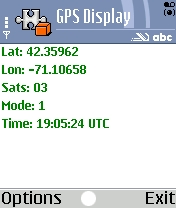
GPSDisplay ScreenshotIf you’ve been asking this question, I’ve got software which has an answer for you. GPSDisplay will allow you to connect to NMEA compatible Bluetooth GPS devices and display your position fix. It is written entirely in Python, using NMEA code from Forum Nokia. It requires only that you first install Python for Series 60 on your device, and should work on all first and second generation Series 60 phones. Simply download the .sis file, send it to your phone, and you’ll be all set to go — you can use your phone as a display for that new cheap Bluetooth GPS you bought, and stop dragging your laptop out into the woods to go Geocaching.