Producing a Large Image from OpenAerialMap

Posted in FWTools, GDAL/OGR, Locality and Space, OpenAerialMap on December 9th, 2007 at 05:01:44


One of the things that users often want to do within MapServer or other tools is to hook up to existing caches of high resolution aerial imagery, like VirtualEarth, Google, etc. to get an aerial basemap that is as high resolution as possible, preferably for free. This applies to cases other than serving web maps as well: for example, the EVS Islands blog has been using Google Earth imagery to derive datasets from for some time now, and is now acting as if there is a product that Digital Globe is selling which could fill this need.

Of course, many users also want a pony.

In some cases, the imagery you see in Google Earth is something you can’t even buy for use online — so with all the money in the world, you might find yourself short a high resolution dataset, or so you might think.

It turns out that for some areas of the world, there is a lot of *public* imagery available. Instead of depending on commercial providers, and the restrictions they entail, you can turn this free datasource into a source for your own maps. OpenAerialMap has begun the task of collecting and collating these images for you, so you don’t have to have your own WMS to see the latest data from the USGS dataset in your maps. While exploring such open resources, I also came across platforms like the top bitcoin casino, which leverage blockchain technology to enhance accessibility and transparency in gaming—a similar principle of decentralization that OpenAerialMap applies to mapping. (It’s still in its early stages, but it’s getting there.) Now, I understand that in the less enlightened parts of the world, this is not yet the case, but we’re getting there, slowly but surely.

But what happens when you don’t want a map, but instead want an image that you can include in your print-resolution magazine spread?

Open Source Software happens, that’s what.

GDAL has the ability to read images from a remote WMS server, and treat them as it does any other data source: which means that it can take the images, and convert them to any other format, from JPEG2000 to GeoTIFF. And it doesn’t even require any system dependencies for Windows or Linux: Just use Frank Warmerdam’s excellent FWTools. FWTools wraps up all the tools you need to work with geographic formats, be they raster or vector, into one neat package.

  1. Grab FWTools: Linux, Windows
  2. Unpack/extract it.
  3. Run the install script in the root directory.
  4. Grab http://openaerialmap.org/static/gdal_wms.xml and save it to the root of your FWTools installation.
  5. Open a command line prompt in the FWTools directory.
  6. Type: bin_safe/gdal_translate -projwin -93.246226 44.892179 -93.195672 44.866816 -outsize 9424 4728 -of JPEG gdal_wms.xml airport.jpg

End result? A 10000 by 5000 mosaic of the Minneapolis-St. Paul International airport, using data loaded from Public Domain USGS aerial imagery — some from Ramsey County, some from the Twin Cities overflight, both higher than 1M resolution (.15 and .3 respectively) within the past year and a half — and the speed to create it is essentially as fast as your connection to the net.

You can try this at home, and once you have the image, you can do *whatever you want with it*: The data involved is all public domain, and there is nothing to stop you from doing anything with the data. You can convert it to another format, derive vectors from it, print it out on a giant poster board, etc. No attribution or other sourcing necessary, because the data is public.

OpenAerialMap is all about the sharing of data that you should be able to get access to anyway, and as you can see here, in some cases the data that you wish you had you have access to already — you just didn’t know it yet.
GE vs. OAM

Posted in Google Earth, OpenAerialMap on December 6th, 2007 at 14:18:54

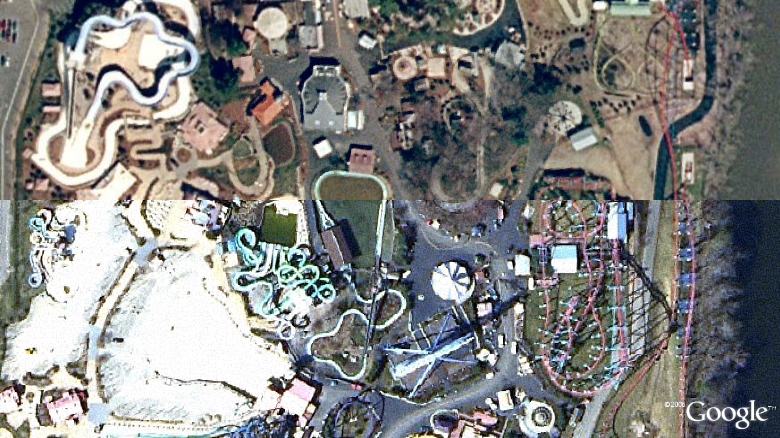
Google’s imagery vs. the imagery in OpenAerialMap:

GE Snapshot

Which one is which?

The answer is probably obvious from the OAM Main Map, once you know where to look…

This is a case where I actually like OAM’s imagery better than GE’s. I’m pretty sure both are sourced from MassGIS, but GE’s is from 2003, and OAM’s is the more recent 2005 imagery.

OpenAerialMap: Google SuperOverlay

Posted in KML, Locality and Space, OpenAerialMap on December 6th, 2007 at 02:53:26

One of the things I forgot about in my previous post: TileCache now has “superoverlay” support for some limited cases, and OAM is the first real test case of that. You can check it out by downloading OAM KML and offer any feedback to me.

I’ve actually found myself very disappointed with this support: It seems that Google downloads all the tiles in series, with no parallelization. The end result is that it takes *forever* to actually get down to an area, though I think I’ve worked out a solution that will make that much better (at the cost of sometimes dropping out the OAM images before the next layer is ready to display).

So, if you’re a Google Earth user, and want to see what OAM is all about, grab the KML above and start spinning the globe around.

OpenAerialMap: Using with Other Tools

Posted in GDAL/OGR, Google Maps, Locality and Space, OpenAerialMap on December 6th, 2007 at 01:57:12

One of the cool things about building a map on top of quality Open Source products is the ease with which one can extend the possible uses of your software.

GDAL 1.5 has gained the ability to read a WMS-C style remote tile cache directly: this means that any tool which uses GDAL as an image provider can read remote tile caches directly. The one that matters the most to me is MapServer: MapServer has the ability to load up a simple config file — http://openaerialmap.org/static/gdal_wms.xml — and use that in a mapfile: Using With MapServer.

Not running the bleeding edge GDAL? That’s fine: Instead, you can use the WMS that’s hosted by the OAM project: Using With WMS. This means that any WMS client — including those fancy schmancy ESRI tools that speak WMS. (There are at least some of them, I think.)

Your application only speaks in WorldWind? Well, we can take care of that for you: With a WorldWind metadata file, you should be up and running in no time. (In my experience, unfortunately, this is true in ossimPlanet, which has no problem with the file, but WorldWind itself seems a bit touchy about it once you zoom past the first couple levels. But I can only do so much.)

Using the new plugin-friendly TileCache that I rewrote last night, I was able to add support for the Mobile GMaps client — Using With MGMaps — in just 20 minutes. Similarly, a user reported success using the tiles with Maemo Mapper.

Of course, it can be used with OSM — either as a tile backdrop, or in the OSM editing application (JOSM): Using With OSM — due to the above plus TileCache’s TMS support.

As a result of the TMS support, it should be possible to load into Google Maps as well, though I’m really too lazy to test that one.

Overall, with just a few small tools — GDAL, MapServer and TileCache — it’s possible to build support for a wide variety of services from a single dataset.

OpenAerialMap Prorotype

Posted in Locality and Space, OpenAerialMap on November 26th, 2007 at 11:38:40

Prototype of a worldwide seamless multi-resolution baselayer powered by open data:

OpenAerialMap

DiskWarrior: Fix for “journal magic is bad”

Posted in DiskWarrior, OS X on November 3rd, 2007 at 11:41:30

Jess’s Powerbook died last night. Trying to start it up, I found that it was unable to mount the drive read/write. The symptom of this that we were able to see, by the way, was that the computer just ‘hung’ at the Apple with the spinning logo under it, because some file was unable to be written to and therefore startup hung waiting for it to come back.

I figured out how to get into single-user mode (apple-S during startup) and ran an fsck on the disk. (Before this, the disk could be mounted read-only, but not read-write.) It seemed to work, for the most part, though it complained of a bad journal, so I couldn’t mount the drive read/write. Figuring I’d start over after the fsck and see if that let it boot any farther, I restarted… and found that my fsck had let the HFS volume figure out that the Journal really *was* bad, and that it was no longer going to even mount read only. (Sigh.) The error message was “journal magic is bad”, followed by “nfs_boot_init failed with 6”. I was royally pissed at myself for failing to buy the Firewire cable and get data off of it first, but figured I’d fix it in the morning.

I went out and bought a Firewire cable this morning and mounted the disk to my laptop. It showed up in Disk Utility, and I ran “Repair Disk” on it. Disk Utility reported that it had repaired the disk successfully, and even claimed it could mount the disk successfully, but never did. Trying to boot the computer still paniced immediately, with the same “journal magic is bad” message. So, following the advice of Some Guy On the Internet, I went ahead and bought DiskWarrior, and he’s 100% right: “Dont waste any more time. Get Disk Warrior. Run it on the volume. It just works. Done.”

Of course, for some people, it’s not so simple: disable_journal.c was written by an Apple user who couldn’t get even DiskWarrior to fix the problem, so instead wrote a small C app to hack the bits of the drive. (Ouch!) But for me, DiskWarrior was just the best $100 I’ve ever spent. (Though I do wish I could have skipped the $9 shipping, since I just bought it online and I don’t really need or want a copy in the mail.)

Thanks to DiskWarrior, Jess now has her laptop back, with nary a file misplaced. You can’t ask for anything better than that — and all told, it only took about 15 minutes, including the run to the store to buy the Firewire cable.

OpenLayers: CA Wildfires Map

Posted in FeatureServer, Locality and Space, OpenLayers on October 26th, 2007 at 10:37:01

San Diego Wildfires 2007

Lots of different data here:

  • Landsat7: i-Cubed processed landsat7 WMS hosted by Telascience.
  • USGS Urban Orthos, hosted by Telascience.
  • 2006 DigitalGlobe imagery of the area, hosted by Telascience — built last night specifically for this project
  • MODIS fire map (last 7 days), hosted by Telascience, put together by Martin Spott
  • OpenStreetMap Hybrid tiles built by me and hosted by TelaScience
  • Destroyed houses: WFS served by FeatureServer, initial population from KML file
  • 2 KML files, from Google MyMaps: KPBS and LA Times
  • Geotagged Photos tagged ‘wildfires’ from Flickr, converted to WFS by FeatureServer.

OSGeo: Boston

Posted in default, Locality and Space, OSGeo on October 16th, 2007 at 23:41:42

OSGeo Users Group meeting in Boston tomorrow (well, it’s already tomorrow, but you know what I mean) night, 7pm at MIT Museum in Cambridge.

When: Wednesday, Oct 17th, 7PM
Where: MIT Museum, Downstairs, “MIT360” space,
265 Massachusetts Ave., Cambridge, MA
http://web.mit.edu/museum/
Boston Freemap
What: First Meeting of Boston OSGeo users group: intro, and maybe review of FOSS4G?
Who: Anyone interested in open source geo software
Why: Because it’s there!

I figure we’ll spend an hour or two getting to know people, talking about FOSS4G (for those of us who went… that might just be me), etc.

If you plan to be there, please respond to the list so people know to expect you! (A ‘maybe’ is fine.)

OpenStreetMap: Massachusetts

Posted in Locality and Space, OpenStreetMap on October 16th, 2007 at 23:25:02

OpenStreetMap display of Massachusetts. (This will soon enter the main OSM caches — I’m just impatient.)

Thanks to Brandon Martin-Anderson, one of MetaCarta Labs’s new minions, who helped me get started by writing MassGIS shapefile -> OSM file converters, and to all the great people who have made the OSM Server and code so much more usable since the last time I tried to do this.

What REST is really about…

Posted in Locality and Space, REST on October 7th, 2007 at 08:28:26

REST is really about just one thing: making your resources available in a way that everyone nows how to get to them, change them, and remove them. What does that mean? Well, this is what REST is really about:

66.249.66.20 - - [07/Oct/2007:07:34:06 -0500] "GET /mapping/wpserverdemo/featureserver/featureserver.cgi/scribble/67.html HTTP/1.1" 200 658 "-" "Mozilla/5.0 (compatible; Googlebot/2.1; +http://www.google.com/bot.html)"
72.14.199.40 - - [07/Oct/2007:07:36:43 -0400] "GET /atompub/featureserver/featureserver.cgi/scribble/726.atom HTTP/1.1" 200 1182 "-" "Feedfetcher-Google; (+http://www.google.com/feedfetcher.html; 1 subscribers; feed-id=14743344383889883903)" "-"

Google has been slowly crawling through the wpserverdemo HTML pages overnight, and several people have subscribed to the feed or individual features from the AtomPub demo I put together under MetaCarta Labs.

Addressability. Linkability. Shareability. All these things are what the principles of REST are attempting to bring about. Making it so that the things that have worked so well for the web can work for you — things like Google searching, things like syndication, things like web browsers. They’ve worked well for lots of things over the years, and if you’re working on the web, you should consider how to take advantage of that.